Work 02 Native Android and device data
Health Data Bridge
A reusable pattern for getting wearable data off the phone: an Android bridge reads Health Connect and syncs to a small self-hosted API that any app can query.
01 The problem
A Galaxy Watch records workouts, heart rate and sleep into Samsung Health, which can publish them into Android's Health Connect. That data then lives on one phone. A web dashboard, a coaching app or a personal assistant on another device can't read it.
Getting it off the phone reliably is harder than it looks. Health Connect hands out changes in pages, records get edited and deleted after the fact, the watch and the phone can report the same steps twice, and Android may delay or kill background work at any time.
02 My role
Sole developer of both halves: the Android bridge app and the service it talks to, including the wire contract between them.
03 Architecture
The bridge asks for read access to each Health Connect record type it supports (32 of them) and syncs whatever the user grants. A full sync walks history in seven-day windows, newest first, and checkpoints after each one. After that, Health Connect's Changes API supplies incremental upserts and deletions, on demand or hourly through WorkManager. Uploads are capped at 500 records, about 3 MB, and a "too large" reply from the server splits the batch.
The service is a Next.js API on Vercel in front of MongoDB Atlas. It stores one canonical document per record, keyed by owner, source, provider, record type and source record ID, so repeated pushes update instead of duplicating. Read-only views (daily activity, heart, sleep, workouts, latest vitals) make the data usable from any driver or chart tool.
04 Two hard decisions
A
The sync position only moves when nothing can be lost
The bridge advances its Health Connect changes token only after every record is either accepted by the service or saved to a durable repair outbox. Network errors leave the token where it was, so the next run replays.
Deletions become tombstones with deletion barriers on the server, and repairs are re-read from Health Connect before retrying. A stale replay can't bring a deleted record back.
B
Everyone runs their own copy
There's no shared backend. Each owner deploys their own service, with their own Atlas database and their own token. The Android app never holds database credentials, and its token is encrypted with an Android Keystore key.
Consuming apps get separate read-only tokens that can be revoked one at a time. Health data stays with the person it belongs to.
05 The result
- Health Connect record types
- 32
- test files across both repos
- 45
- days of history backfill
- 365
- click to deploy your own service
- 1
The bridge and service are designed to be reused: the service already feeds a personal dashboard, and any app with a read token can use the same records, a cursor-paged change feed and daily summaries.
Where the watch and the phone both report steps or calories, the daily view takes the larger single-device total instead of adding them, and the docs say it's a heuristic.
The JVM tests use synthetic records and fake HTTP responses. Real devices and producers vary, so coverage on a given phone still needs checking on that phone.
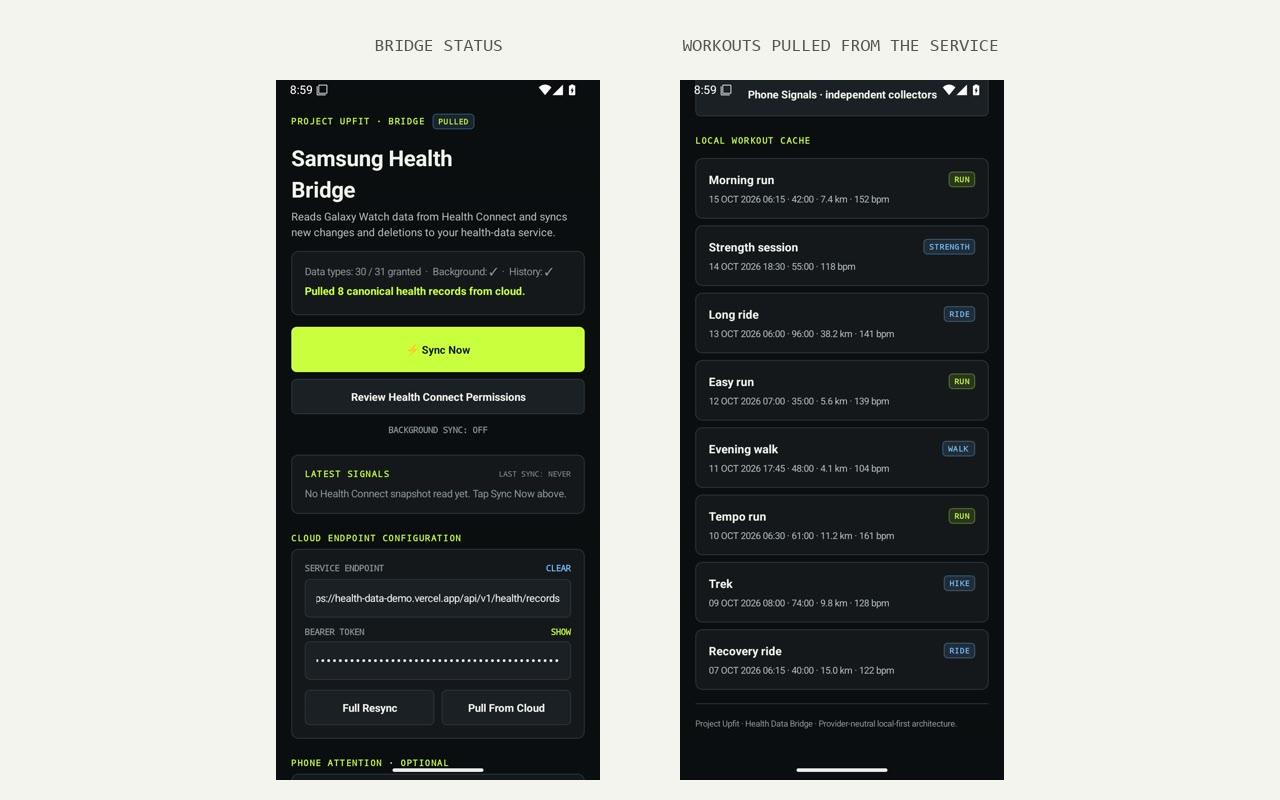
Screens show seeded demo data on local or emulated devices. No real users or records.